
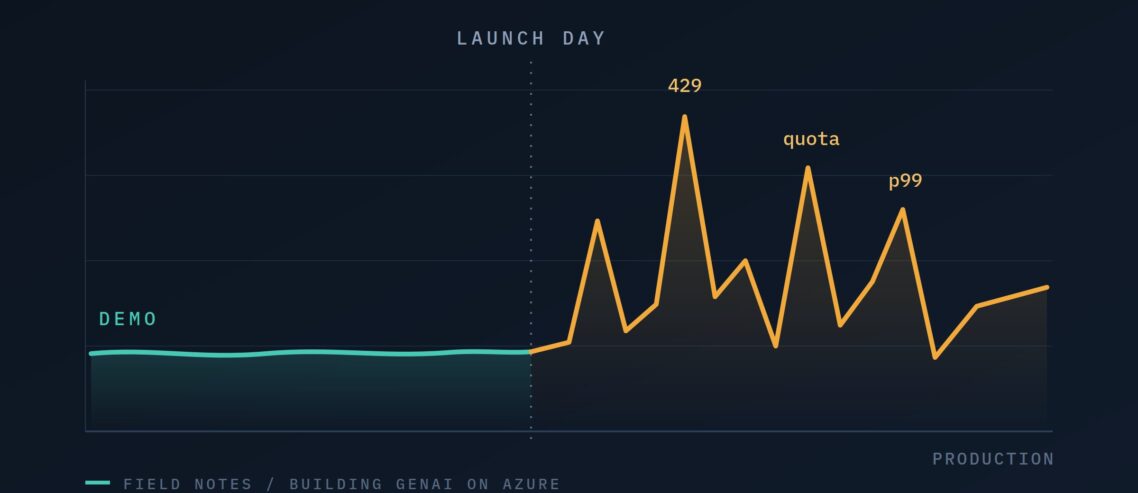

Your GenAI Demo Works. Will It Survive Production? 12 operational lessons from working with startups building AI products on Azure
Over the past couple of years, I’ve worked with dozens of startups building GenAI products — from customer chatbots to document intelligence platforms. And I’ve noticed a pattern: getting a great demo working takes a weekend. Getting it to survive real production traffic is a completely different game.
The gap is almost never about the model or the prompts. It’s about the operational details nobody tells you about until they bite you. So here are the key things I suggest every founder pays attention to, before their launch day. I want to thank my exceptional colleagues Oscar Maqueda, Axel Maceron, and Vasilis Salis, for all the knowledge and expertise they shared with me on these topics.
1. Your quota will not be enough — and increases take time
When you start, OpenAI, Anthropic, and Azure give you standard quotas measured in tokens per minute (TPM) and requests per minute (RPM). For development, they’re plenty. For production, they’re often not.
Here’s the catch: quota increase requests are not processed automatically. They can take days to be approved, and priority goes to customers already using their existing allocation. On Azure, quota is assigned per region, per subscription, per model — so if you deploy in two regions, you request increases in each one separately. The quota increase request form is available at: https://aka.ms/oai/stuquotarequest
The lesson: forecast your token consumption early, and request increases before you need them, not the day your app goes viral.
🔗 Azure OpenAI quotas and limits · How to manage quota
2. There is no latency guarantee on the standard tier
If you’re running a customer-facing chatbot or anything latency-sensitive, you need to know this: standard pay-as-you-go access comes with no latency guarantee. Performance is best-effort, and it varies with the overall load on the platform. Your response times at 3 AM and at peak business hours are not the same.
On Azure OpenAI, you can fix this with priority processing (pay-per-token, but your requests skip the queue) or provisioned throughput units (PTUs) — reserved capacity with documented latency targets on token generation.. Both cost more than standard (e.g priority processing costs 1.7x to 2x according to Priority Processing for API Customers | OpenAI), but for a product where user experience is the product, predictable latency is worth it.
If you ask what is the difference between priority processing vs provisioned throughput, here is how to think of it:
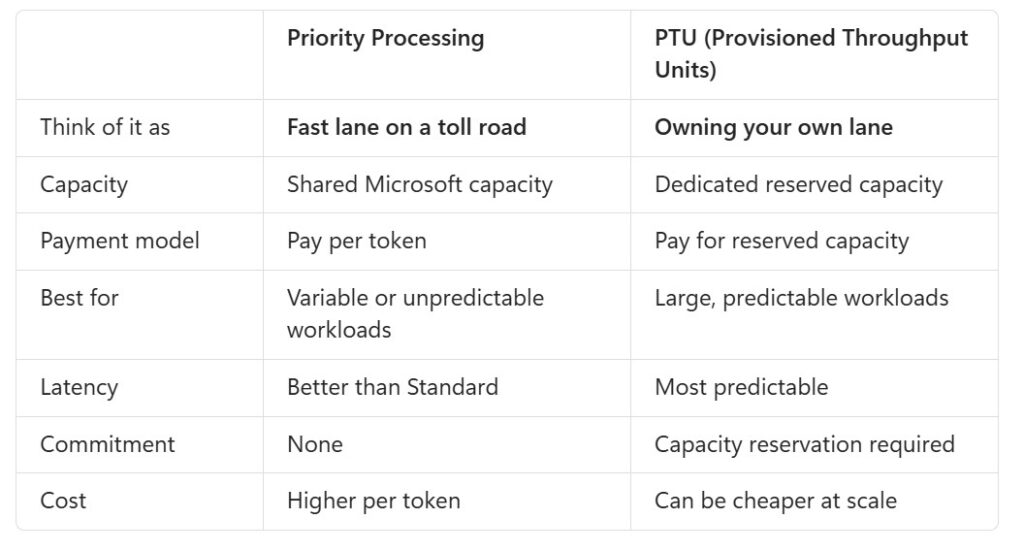
So, Priority Processing is an easy performance upgrade. PTU is an infrastructure decision.
The lesson: decide early which of your workloads are latency-critical, and budget for the right deployment type for those.
3. Plan for the day your LLM endpoint goes down
It will happen: a region has an issue, a model deployment gets throttled, an endpoint becomes unresponsive. If your app talks to a single LLM endpoint in a single region, that’s a single point of failure.
The pattern I recommend on Azure: put Azure API Management (APIM) in front of your model deployments as a GenAI gateway. Secure quota in at least two regions, run against your primary, and let APIM’s load balancing and circuit breaker policies automatically divert traffic to the secondary when something breaks. Your application code doesn’t change — the gateway handles it.
The lesson: failover is not a “later” feature. Build the gateway pattern in from day one; it’s much harder to retrofit.
🔗 AI gateway capabilities in Azure API Management · GenAI gateway reference architecture
4. “Global” deployments and GDPR don’t always mix
When you choose a Global deployment for your model, your data at rest stays in the geography of your Azure resource — but inference processing can happen in any region where the model is deployed, including outside the EU. Microsoft routes globally for capacity and performance, which is exactly what you want for throughput and exactly what your customer’s legal team doesn’t want to hear.
If you need EU data processing (GDPR, customer contracts, regulated industries), look at Data Zone deployments. Data at rest still stays in the geography of your resource, and inference processing stays within the Microsoft-defined EU data zone. One detail worth knowing: the EU data zone follows the European Union Data Boundary, which covers EU member states plus EFTA/EEA countries — so a resource in Norway East or Switzerland North qualifies, even though neither country is in the EU. Useful if you’re serving customers there.
Regional deployments are the strictest option: everything — storage and inference — stays in the single Azure region you pick. The trade-off is availability. Not every model or version ships in every region, and you’ll typically see newer models arrive on Global first, Data Zone next, Regional last. If your architecture demands Regional, check model availability before you commit to the region.
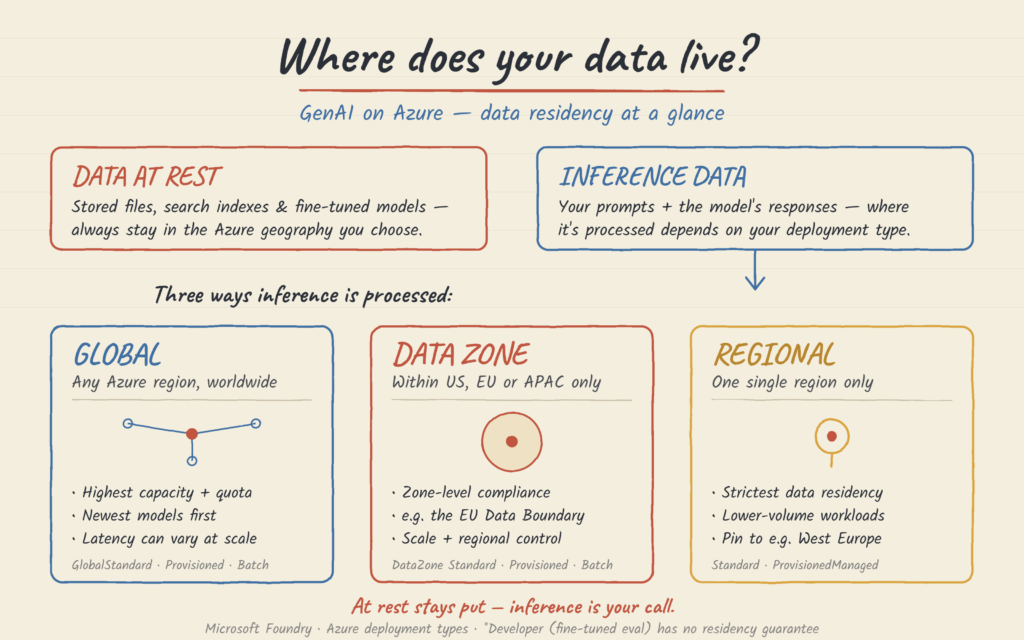
The lesson: check the deployment type before you sign your first enterprise customer, not after their legal team asks where the data goes. And write the answer down — “where is our inference processed?” is a question you’ll answer in every security review from now on.
I prepared an animation (thank you Claude :)) that explains the above:
🔗 Azure OpenAI Data Zones announcement · Deployment types and data processing locations
5. Stop sending every request to your most expensive model
Most teams pick one model and send everything to it. That means you’re either overpaying on simple requests or underperforming on complex ones.
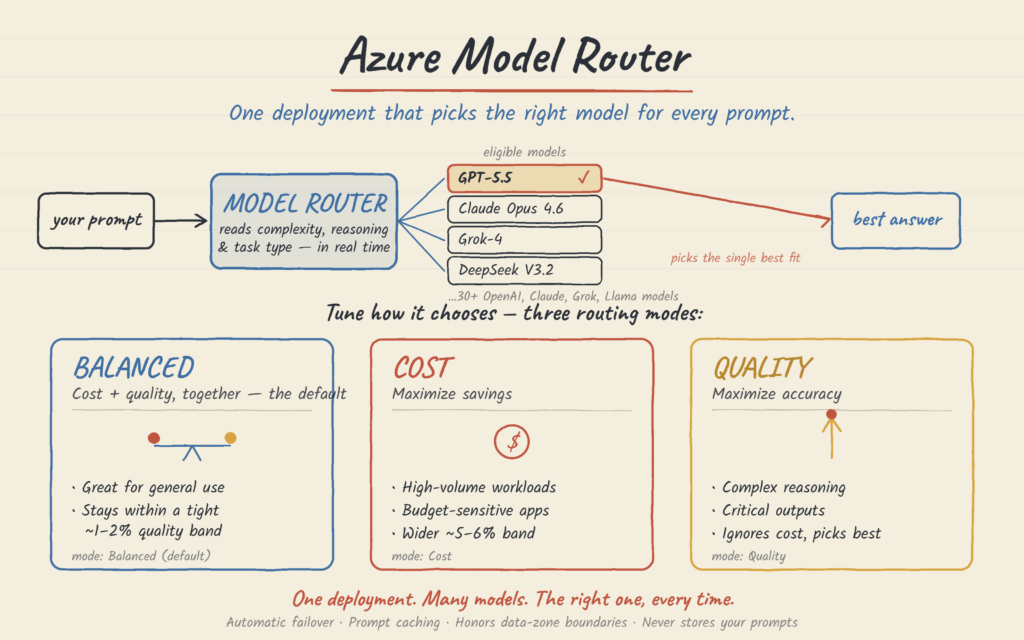
Azure AI Foundry’s model router solves this elegantly: it’s a lightweight ML model that analyzes each prompt in real time and routes it to the most suitable model behind a single endpoint. Simple questions go to smaller, cheaper models; complex reasoning goes to the big ones. You can restrict routing to a subset of approved models for governance, and choose between cost-optimized, balanced, and quality-optimized routing modes. No changes to your application code.
The lesson: “which model?” is the wrong question. The right question is “which model, when?”
🔗 Model router in Azure AI Foundry
6. Models retire — have a migration plan
The model you build on today will be deprecated and eventually retired. This is normal: GA model versions are guaranteed for a minimum period, then you get advance notice before retirement — but “advance notice” only helps if someone is watching for it.
The lesson: subscribe to retirement notifications, avoid hard-coding model versions deep in your stack, and treat model migration as a recurring engineering task — not an emergency.
🔗 Azure OpenAI model deprecations and retirements
7. Content filters can block your legitimate traffic – and Microsoft keeps a copy
Azure OpenAI applies content filtering by default on both prompts and completions. For most apps this is exactly what you want. But if you operate in domains like healthcare, legal, gaming, or security, the default filters can occasionally block legitimate requests — and your users will see errors instead of answers.
The filters are configurable: you can tune severity levels per category, and enable extras like prompt injection detection (prompt shields) and protected material detection. Turning filters off entirely requires a separate approval process — which takes time, so plan for it. Here is the content filtering disable request form: Limited Access Review: Modified Guardrails (previously Content Filters).
If you are a managed account from the Microsoft team, connect with your account manager to get help on the request.
There’s a second half to this that surprises people. Alongside filtering, Azure OpenAI runs abuse monitoring: by default, your prompts and completions are stored for up to 30 days so that Microsoft can detect and investigate patterns of misuse. If a pattern is flagged, authorized Microsoft employees may review that data. For most startups this is a non-issue. But if you’re handling patient data, privileged legal material, or anything covered by a strict customer DPA, “Microsoft may store and review our prompts for 30 days” is a sentence you do not want to discover during an enterprise security review.
The good news: it’s the same door. Modified abuse monitoring — where no prompts or completions are stored — is requested through the same Limited Access review as the content filter changes. So if you know you’ll need either one, apply for both in one go rather than queueing twice.
The lesson: test your real-world prompts against the content filters before launch, and know what’s being retained before a customer’s legal team asks you.
🔗 Configure content filters in Azure OpenAI
8. You’re probably leaving 30–50% of your budget on the table
Two features most startups ignore for months:
Prompt caching. If your requests share the same beginning (system prompt, tool definitions, reference docs), the service caches those input tokens and serves them at a steep discount — with lower latency too. It’s automatic, but only if you structure your prompts with the static content first. One misplaced dynamic token at the top of your prompt breaks the cache for everything after it.
Batch API. For anything that doesn’t need a real-time answer — document processing, embedding backfills, nightly report generation — the Batch API runs at roughly half the cost of standard, with a 24-hour turnaround and its own separate quota.
The lesson: cost optimization in GenAI is mostly architecture, not negotiation.
🔗 Prompt caching with Azure OpenAI · Batch API and cost updates
9. “It looks fine in the playground” is not a deployment gate
Every model swap, version upgrade, or prompt change can silently change your product’s behavior. The teams that sleep well at night have a fixed evaluation dataset — real examples from their domain — and run every change against it before it reaches production, measuring quality, safety, and regression.
Azure AI Foundry has built-in evaluation tooling for exactly this: you can score model and agent outputs against your test data using built-in or custom evaluators, before and after deployment.
The lesson: build your eval set from day one. It’s the cheapest insurance policy in GenAI.
🔗 Run evaluations in Azure AI Foundry
10. If you can’t see your tokens, you can’t manage your business
Token consumption is your cost structure. Latency percentiles are your user experience. Error and throttling (429) rates are your reliability. If you’re not tracking these per deployment, you’ll find out about problems from angry users and surprising invoices.
Azure gives you this out of the box: monitoring dashboards for token usage, latency, error rates, and PTU utilization, integrated with Azure Monitor and Application Insights — including distributed tracing across your whole AI application. And while you’re at it: implement retry logic with exponential backoff for throttled requests. 429s at scale are a fact of life; naive retry loops make outages worse.
The lesson: observability is not a nice-to-have — it’s how you do capacity planning, cost control, and debugging in one place.
🔗 Observability in generative AI on Azure
11. GPU capacity is not a given — plan for it or design around it
If your roadmap includes self-hosting or fine-tuning models on your own GPUs, here’s a reality check: every Azure subscription starts with no GPU quota. You can’t launch a single GPU VM until you submit a quota increase request with a business justification — and for high-demand hardware like H100-class instances, approval in popular regions can take anywhere from days to several weeks. Even with approved quota, on-demand availability isn’t guaranteed, and requests sometimes get rejected simply due to insufficient regional capacity. Startups on sponsorship or free credits – e.g on the Microsoft for Startups program – often have an even harder time, as paying customers get priority.
What actually works:
- Be flexible on region. The GPU you can’t get in West Europe might be sitting available in another region. If your workload allows it, chase the capacity, not the geography.
- Ask early and justify well. A concrete business case (“production inference for X customers, Y requests/day”) gets approved faster than “we want to experiment.”
- Consider reservations for steady workloads — committed capacity comes with much better availability guarantees — and spot VMs for interruptible training jobs at a fraction of the cost.
- Question whether you need GPUs at all. This is the big one. Most startups don’t actually need to manage GPU infrastructure — the managed, serverless model APIs (Azure OpenAI, Foundry Models) give you frontier models with no capacity hunting, and no idle GPUs burning your runway at 3 AM. Self-hosting makes sense for specific cases (custom models, extreme cost optimization at scale, strict isolation requirements) — but it should be a deliberate choice, not a default.
The lesson: GPUs are the new real estate — location matters, availability is scarce, and the best deal is often not needing to buy at all.
🔗 Azure GPU VM families and quota process · Deployment options from serverless to managed compute
12. Multi-tenancy is not a “when we have customers” problem
You build your first version for one customer. It works beautifully. Then a few more arrive, and three questions show up that you can’t answer.
What does each customer actually cost us? You have one bill and no way to split it. So you can’t tell which accounts are profitable, and you can’t price the next deal with any confidence.
Why did everyone slow down at 9 AM? Because one customer ran a big job, and they’re all sharing the same capacity. You have no way to slow down just that one.
How do you guarantee our data stays ours? An enterprise prospect will ask this. If the answer is “there’s a filter in our code,” their security team will not love it.
None of this is hard to build upfront. All of it is painful to add later, because the customer’s identity has to travel through every layer of your system — and adding that to a codebase you’ve already grown is a bad week.
Three things to do from day one:
Tag every request with the customer it belongs to. One label, passed through your gateway and attached to every log. That single change gives you per-customer cost reporting, which is a number your investors will eventually ask for.
Set limits per customer, not just overall. The gateway you’re already building for failover (point 3) can do this. Then one customer’s heavy day stays their problem, not everyone’s.
Choose your data separation deliberately. Everyone in one shared store with filters is cheapest and works fine for most companies. A separate store per customer costs more but makes the separation real rather than something your code has to remember. Big or regulated customers sometimes require it in the contract. The bad outcome is not choosing — that’s how a filter gets forgotten.
There’s a bonus: once you know what each customer consumes, the decision from point 2 gets easier. You can put your demanding enterprise accounts on reserved capacity and leave everyone else on standard, instead of paying premium rates for all of them.
The lesson: labelling requests by customer is the cheapest thing you’ll ever add, and the most expensive thing you’ll ever add late. Do it before customer number two.
The bottom line
None of these twelve points is rocket science. But each one, ignored, has cost a real startup real money, real customers, or real sleep. The good news: they’re all solvable with a bit of planning — and the earlier you plan, the cheaper the solution.
If you’re in the Central/Eastern Europe area, building a GenAI product and want to talk through your architecture before these lessons find you the hard way, reach out — this is exactly what our team does every day.

Comments
Leave a Comment